7 minutes
API Data Model in Adonis and Postgres
Prerequisites
A fresh Adonis project configured with a running Postgres DB. You can create one by following this guide.
Fresh start
Make sure that there is no migration run until this point by executing:
adonis migration:status
If there are migrations that have already been ran, reset them by executing:
adonis migration:reset
Data model we are going to implement
The model consists of three entities: user, post, and post_status.
The details of the entitites and the relationships between them are presented below:
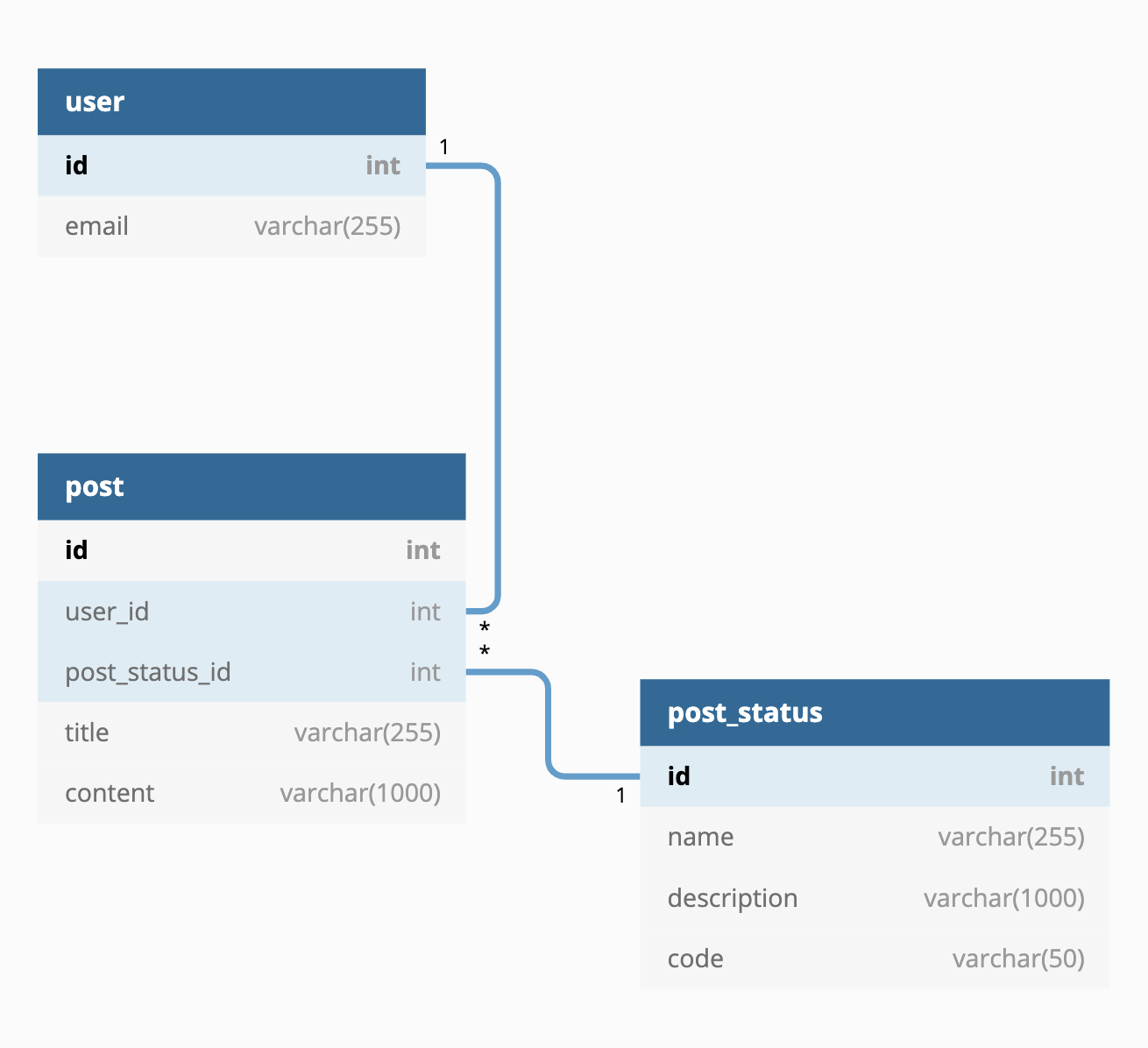
Setup table schemas and Lucid ORM models
Update the schema and model for the entities created by Adonis (users and tokens)
Delete the username and password columns from the user migration schema (we will not need them):
(Also, rename the table from users to user).
// file: database/migrations/*_user.js

class UserSchema extends Schema {
  up() {
    // updated from users to user
    this.create('user', table => {
      table.increments()
      table
        .string('email', 254)
        .notNullable()
        .unique()
      table.timestamps()
    })
  }

  down() {
    // updated from users to user
    this.drop('user')
  }
}
Update the tokens table name to token (singular form):
// file: database/migrations/*_token.js

class TokensSchema extends Schema {
  up() {
    // updated from tokens to token
    this.create('token', table => {
      table.increments()
      table
        .integer('user_id')
        .unsigned()
        .references('id')
        // updated from users to user
        .inTable('user')
      table
        .string('token', 255)
        .notNullable()
        .unique()
        .index()
      table.string('type', 80).notNullable()
      table.boolean('is_revoked').defaultTo(false)
      table.timestamps()
    })
  }

  down() {
    // updated from tokens to token
    this.drop('token')
  }
}
When working with models, Adonis assumes by default that the table names are in plural form.
Throughout this guide we will update every model to work with the singular form of the
coresponding table name by adding the get table() static method to the model class.
This is just my preference.
Update the User model:
// file: app/Models/User.js

class User extends Model {
  static get table() {
    return 'user'
  }

  // other code
}
Update the Token model:
// file: app/Models/Token.js

class Token extends Model {
  static get table() {
    return 'token'
  }
}
Create the PostStatus schema and model
The migrations need to start from the entities that don’t depend on other entities.
Create the PostStatus model (pass -m to also create the schema migration file):
adonis make:model -m PostStatus
Update the table name to post_status (singular form) in the model:
// file: app/Models/PostStatus.js

class PostStatus extends Model {
  static get table() {
    return 'post_status'
  }
}
Update the table name to post_status (singular form) and add our column definitions in the migration schema:
// file: database/migrations/*_post_status_schema.js

class PostStatusSchema extends Schema {
  up() {
    this.create('post_status', table => {
      table.increments()
      table.string('name', 255)
      table.string('description', 1000)
      table.string('code', 50).unique()
      table.timestamps()
    })
  }

  down() {
    this.drop('post_status')
  }
}
Create the Post schema and model
Create the Post model (pass -m to also create the schema migration file):
adonis make:model -m Post
Update the model to use the new table name post (singular form) in the model:
// file: app/Models/Post.js

class Post extends Model {
  static get table() {
    return 'post'
  }
}
Update the table name to post (singular form) in the migration schema and add our column definitions:
// file: database/migrations/*_post_schema.js

class PostSchema extends Schema {
  up() {
    this.create('post', table => {
      table.increments()
      table
        .integer('user_id')
        .references('id')
        .inTable('user')
      table
        .integer('post_status_id')
        .references('id')
        .inTable('post_status')
      table.string('title', 255).notNullable()
      table.string('content', 1000).notNullable()
      table.timestamps()
    })
  }

  down() {
    this.drop('post')
  }
}
Define the relationships between entities
Add the user relationship to the posts:
// file: app/Models/User.js

class User extends Model {
  // other code

  posts() {
    return this.hasMany('App/Models/Post')
  }
}
Add the post status relationship to the post:
// file: app/Models/PostStatus.js

class PostStatus extends Model {
  static get table() {
    return 'post_status'
  }

  posts() {
    return this.hasMany('App/Models/Post')
  }
}
Create the tables
Run the migrations using:
adonis migration:run
It should output Database migrated successfully and if you refresh the Adminer page you should
see the new tables.
Seed data
It’s nice to have some data created automatically so we have something to work with.
Run the following command to create the Dev seeder. This will seed data for the development environment. Later you might want to define a Prod seeder, which will seed data for the production environment:
adonis make:seed Dev
Create the factories
Factories are used in the seeder to easily create entities with mocked (and some real) data.
// file: database/factory.js
const Factory = use('Factory')

Factory.blueprint('App/Models/User', faker => {
  return {
    email: faker.email({ domain: 'example.com' }),
  }
})

Factory.blueprint('App/Models/Post', faker => {
  return {
    title: faker.sentence(),
    content: faker.paragraph(),
  }
})
Here, the faker object is an instance of the chance.js library.
Create the seeder
Seeders are the guys who put the seed data (which can come from the factories defined above) into the DB.
There will be only two post_statuses, so we define them separately before the seeder class:
// file: database/seeds/DevSeeder.js

// other code

const POST_STATUS_DRAFT = {
  name: 'Draft',
  description: 'This post is a work in progress.',
  code: 'DRAFT',
}
const POST_STATUS_PUBLISHED = {
  name: 'Published',
  description: 'This post is published.',
  code: 'PUBLISHED',
}

class DevSeeder {
  // other code
}
In the code below we define the seeder logic. First, note that we also get the PostStatus model from the DI container. Next, the logic is as follows:
-
Create the entities without dependencies first.
-
For every non dependent entity, create the entities that depend on them and save them to the database through the parents relationship defined in the Model. In this way, the Lucid ORM will also automatically create the connection between the entities in the DB (by setting the foreign keys).
One important thing to note here is that I haven’t yet found a way to seed data for entities that
have multiple foreign keys that are notNullable(). The reason is that you can’t set an ORM
relationship without trying to save the parent entity to the DB, meaning you can only set 1 foreign key
bofore the INSERT operation is performed. Of course, the DB will throw an error because we are trying
to set NULL values to notNullable() fields.
// file: database/seeds/DevSeeder.js

//other code
const Factory = use('Factory')

const PostStatus = use('App/Models/PostStatus')

// other code

class DevSeeder {
  async run() {
    // Create the user model instances (without inserting them into DB).
    const users = await Factory.model('App/Models/User').makeMany(5)

    // Create and insert the postStatus model instances into the DB.
    const postStatusDraft = await PostStatus.create(POST_STATUS_DRAFT)
    const postStatusPublished = await PostStatus.create(POST_STATUS_PUBLISHED)

    // For each user create 2 posts to be saved as DRAFT and 3 posts
    // to be saved as published.
    // Then associate the user and the postStatus to the posts by
    // inserting the posts to the DB through the relationships
    // with the aforementioned entities.
    users.forEach(async user => {
      const postsDraft = await Factory.model('App/Models/Post').makeMany(2)
      const postsPublished = await Factory.model('App/Models/Post').makeMany(3)

      await postStatusDraft.posts().saveMany(postsDraft)
      await postStatusPublished.posts().saveMany(postsPublished)

      await user.posts().saveMany(postsDraft)
      await user.posts().saveMany(postsPublished)
    })
  }
}
Run the seed and populate the DB
Run the seed with:
adonis seed
It should output Seeded database and if you refresh Adminer you should now see the
user, post_status, and post tables populated with data.
Ending
This is it! I hope this article provides a good starting point in modelling and seeding your data in Adonis and PostgreSQL.
In the future this article may get updated if I come by any other difficulties which are worthy to be exemplified here.
Important notes
Sometimes the SQL relationships are not intuitive
Altough at first glance it appears that the relationship between a post and a post_status is a hasOne relationship, that’s not true - it would mean that every post has a separate row in the post_status column. Actually, in the SQL sense, one post_status hasMany posts.
This is how I naively defined the relationship at first:
// file: app/Models/Post.js

class Post extends Model {
  static get table() {
    return 'post'
  }

  postStatus() {
    return this.hasOne('App/Models/PostStatus')
  }
}
Common errors
If you get TypeError: Cannot read property 'name' of undefined when you try to run the seed using factories,
you may have misspelled the name of the model in the factory declaration (or there is no factory defined for
that model).
If you get TypeError: relatedInstance.save is not a function you may have called the save method instead of the
saveMany for saving an array of model instances.